
The AI control panel is moving into everyday software
AI change is no longer only a model-launch story. The hotter question is which settings, permissions, costs and logs move into the ordinary tools families, schools and teams already trust.
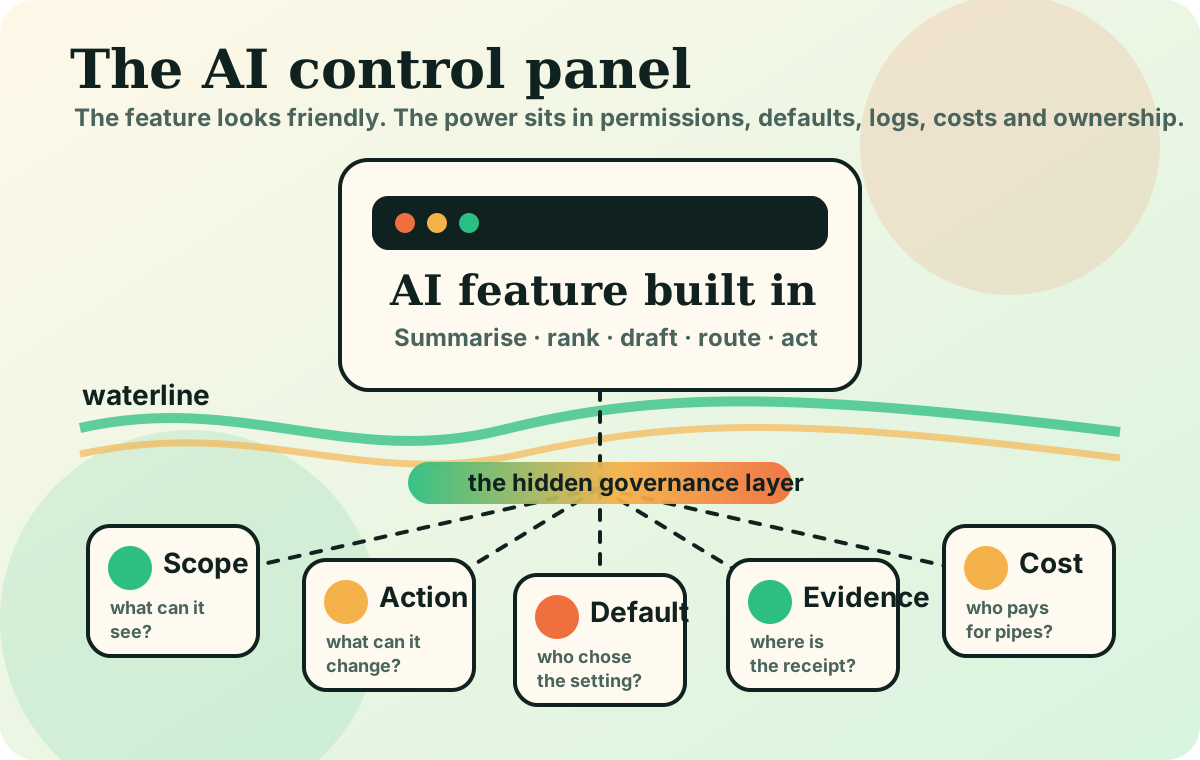
AI power increasingly sits in ordinary software defaults: who can turn it on, what it sees, what it changes and who can inspect the result.
When an app says AI is built in, look for the control panel: permissions, logs, opt-in defaults, appeal routes and infrastructure costs.
The next AI shift may not look like a new robot, a dramatic demo or a bigger chatbot window.
It may look like a small settings panel inside software you already use: a toggle for automatic summaries, a box that lets an assistant browse files, a permission to send email, a default that ranks applicants, a button that turns one prompt into a finished design, lesson plan or support reply.
That is why the control panel matters. When AI becomes ordinary infrastructure, power moves into the defaults: who can turn the system on, what it can see, what it can change, what it costs to use, where the evidence trail lives and who can challenge the result.
The visible feature is not the whole system
A chatbot feels like a conversation. A control panel is a governance layer.
Think of a smart thermostat in a shared building. The number on the wall matters, but so do the hidden rules: who can adjust it, when it overrides manual control, which rooms it measures, how much energy it uses and who pays the bill. AI features are developing the same kind of hidden machinery.
The public sees the polite answer. The institution lives with the permissions, logs, costs and defaults underneath it.
Three current signals to read together
First, adoption is now broad enough that indirect exposure matters. Stanford HAI’s 2025 AI Index reported that 78% of organisations said they used AI in 2024, up from 55%. The everyday implication is that even non-users meet AI through other people’s tools: the support reply, the hiring screen, the school feedback, the slide deck, the search answer.
Second, workplace use spreads through tasks rather than job titles. Anthropic’s Economic Index found AI use appearing in at least a quarter of tasks across roughly 36% of occupations. That means the control question is not only “will this job disappear?” It is “which step in this job now begins with an AI-shaped draft, ranking, recommendation or route?”
Third, the infrastructure is physical. The IEA’s 2025 Energy and AI report points to data-centre electricity demand potentially rising from about 460 TWh in 2022 to about 945 TWh in 2030. The control panel is not only about software permissions. It is also about who owns the pipes, who pays for capacity and who can switch access off.
Five controls readers should look for
When an AI feature arrives in a school, office, public service or family app, the useful questions are boring on purpose.
| Control | Plain-English question | Everyday example |
|---|---|---|
| Scope | What can it see? | Can the assistant read one document, the whole inbox or shared drives? |
| Action | What can it change? | Does it only draft a support reply, or can it refund, escalate or close the ticket? |
| Default | Who chose the setting? | Was AI summarisation opt-in, or did it become the default for every meeting? |
| Evidence | What proof remains? | Can a parent, manager or citizen inspect sources and decision steps later? |
| Cost | Who pays and who gains leverage? | Does a “free” feature create a cloud bill, data dependency or locked-in workflow? |
None of these questions requires technical expertise. They require noticing that the friendly interface is attached to a system of power.
Why this is a Boiling Frogs story
The water warms when the feature feels convenient and the control layer stays invisible.
A school adopts automated feedback because teachers are stretched. A manager lets a tool summarise performance notes because the week is busy. A customer-support team lets an AI triage cases because queues are long. A family accepts an answer box because clicking through sources feels slow. Each decision is understandable. Together, they move the normal baseline.
The danger is not only that AI is wrong. It is that the route to question it becomes harder to find.
The practical reader test
The next time a familiar app announces “AI built in”, do not start with whether the demo looks impressive. Start with the control panel.
Ask:
- Who turned it on? A user, an administrator, a vendor, a school, an employer?
- What data entered the water? Private documents, student work, customer records, public web pages, meeting notes?
- What changed automatically? A summary, a ranking, a route, a file, a message, a payment, a judgement?
- Where is the receipt? Is there a source trail, log, appeal route or human sign-off?
- What dependency was created? More cloud cost, more platform lock-in, more reliance on a system few people understand?
That turns AI news from a model-name race into a household and workplace checklist.
Boiling Frogs lens: the feature is the ripple. The control panel is the heat source. Track who owns the settings, and you will see where normal life is being rewritten.
Sources: Stanford HAI AI Index 2025, Anthropic Economic Index, IEA Energy and AI 2025.